Export to Excel
Save a load order as an .xlsx workbook with clear headings, column filters and a fixed header row. Mod names, filenames and versions stay as text.
 V3.0 Final 1 · Windows & Linux
Final 1 brings Excel export, an easier way to clear your search and fixes for missing-file warnings. GMC Community website importing is still here: choose your order on the website, review your installed mods and apply when ready.
V3.0 Final 1 is now the main release for Windows and Linux. The older V2.1.6 Windows build is still available on the download page.
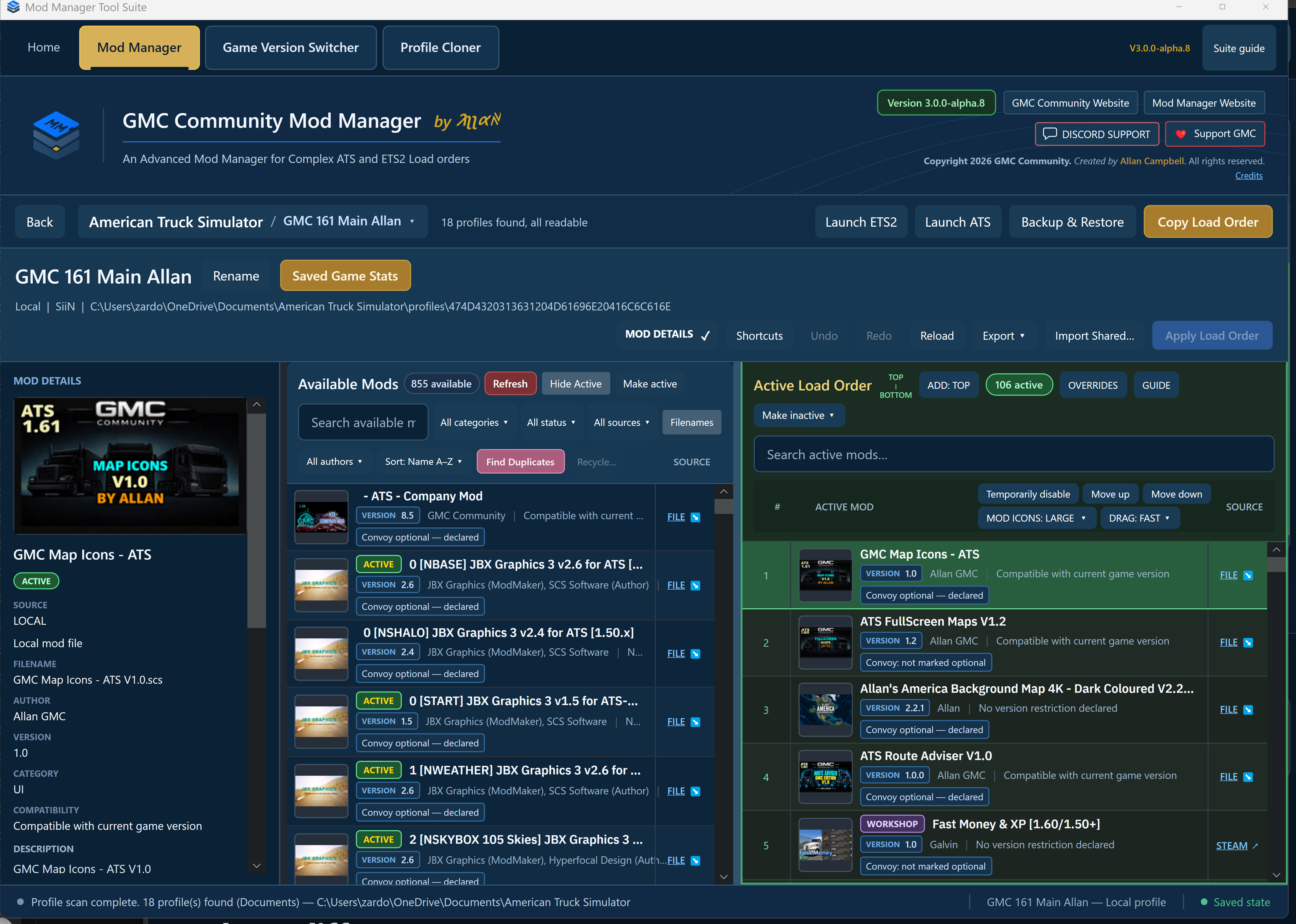
GMC Community Website load-order support stays in place, alongside these additions.
Save a load order as an .xlsx workbook with clear headings, column filters and a fixed header row. Mod names, filenames and versions stay as text.
The Active Load Order search now has a Clear button, just like Available Mods. Clear the search without changing your order or other filters.
Includes the fix for supported .scs.zip files being shown as missing or blocking a shared load-order export.
The in-app guide is shorter, Apply shows a more accurate count when temporarily disabled mods are involved, and Linux gives a clearer message for unsupported preserved Windows/Proton game launches.
CSV and TXT exports remain available. CSV now uses plain version values; choose Excel export for a formatted spreadsheet. To share an order for importing into Mod Manager, use .gmcorder.
Final 1 opens load orders exported by the GMC Community website and matches them against the mods you have installed. Review the matches, then choose when to save.
On the GMC Community website, select your game, game version and intended combo—Classic or Extra. Download its load-order export.
Close the game, choose the matching ETS2 or ATS profile, and finish or undo any existing edits. Keep a backup before changing your order.
Choose the gold Import GMC Load Order… button and open the website export. This is separate from Import Shared Load Order, which opens exports made by Mod Manager.
Unique filenames, Workshop IDs and supported name matches can be matched automatically. Review suggested files and make choices for anything still unresolved. Expected and installed version differences stay visible as warnings.
Loading replaces the working order, including extra active mods; it does not merge them in. A full import needs every entry matched. If you explicitly skip entries, the order is marked incomplete and the omissions are shown again before saving. Missing maps or fixes may make it unusable.
Review the loaded order, then choose Apply Load Order to save with the normal backup and game-running checks. Loading an import alone does not save it to your profile.
The familiar jobs, with a rebuilt interface and a few useful additions.
There are separate 64-bit builds for both systems. Avalonia is the toolkit behind the new interface; you don’t need to know anything about it to use the app.
Both mod lists can show whether a mod’s manifest declares it optional for Convoy. Use Convoy labels: ON/OFF beside Mod Details to choose; the app remembers your preference. If that information cannot be read or is uncertain, it shows as unknown. This is not a guarantee of multiplayer compatibility.
Find Duplicates separates confirmed identical copies from Possible versions that need your review. Filenames help you compare them. Nothing is automatically selected for removal or deleted.
You can still scroll both lists, search, filter, select mods and read their details while the game is running. Editing and applying changes remain locked, and pending changes are kept.
Compatibility colours, the dark Windows title bar, Proton game-version reading, Hide Active refresh fixes, group movement and optional missing Workshop name lookup are retained.
Both downloads are V3.0 Final 1. Close older instances, extract into a new folder and check the running app shows Final 1. Keep backups before making changes.
The Windows x64 build includes the .NET runtime. Extract the complete package before opening the app.
Windows Final 1 on ModsFireThe Linux build includes the .NET runtime. The historical Steam-launch issue is not confirmed resolved. Please include your distribution, game setup and running app version when asking for help.
Extract the ZIP, then run ./GmcModManager. If it is not executable, use chmod +x GmcModManager first.
Post in GMC Community Discord with your operating system, running app version, what you clicked and what happened. For website imports, include your game/version, combo branch and any missing or unresolved entries. Include a screenshot or crash report where useful; share private paths and personal details privately.
Thanks to Jerry for his work on the Avalonia port, and to Chris and everyone helping test it.